Integrating Applications Within Your Organization
With NocodilySuite, you can build multiple microservice APIs and WebUIs within a single organization.
Each system operates independently, yet functions as a unified organizational foundation through a shared authentication layer.
As the number of systems grows, so does the cost of managing them individually.
NocodilySuite keeps each system loosely coupled while achieving consistent governance and integration across the entire organization.
Building Multiple Systems Within an Organization
You can build independent systems for each department or business function on NocodilySuite.
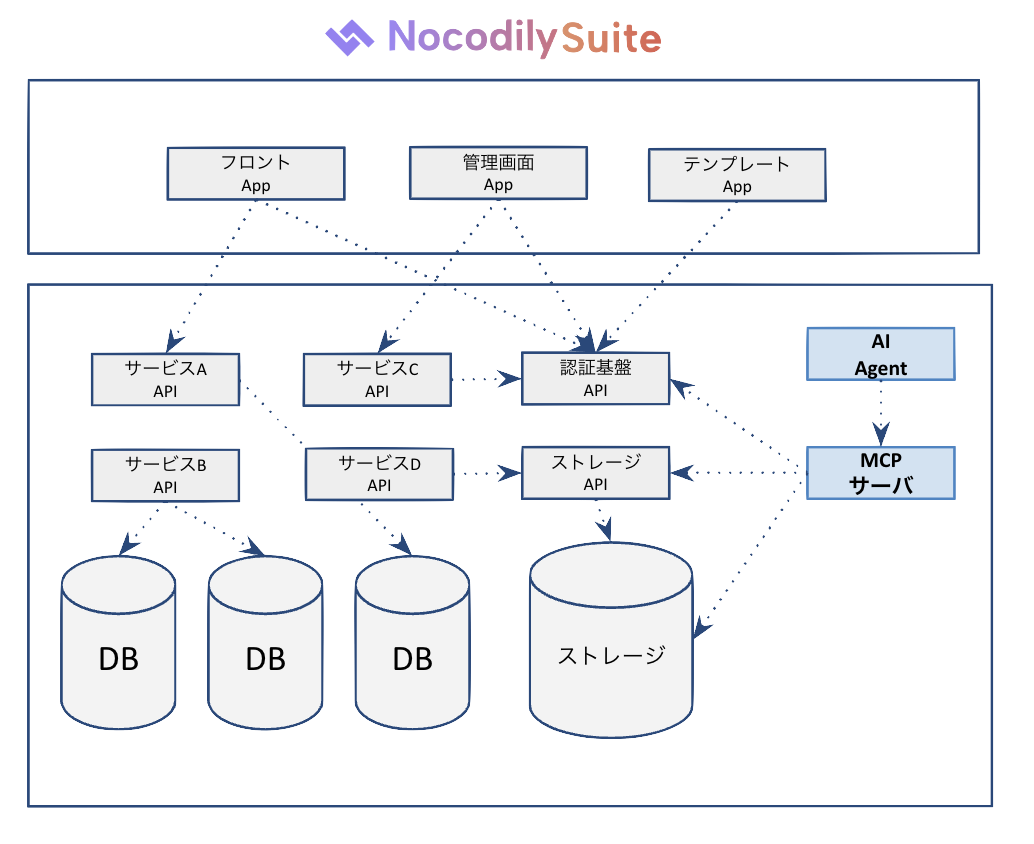
Each system has its own dedicated database, so data never gets mixed across systems.
However, by sharing a single IAM API (authentication foundation), users can access multiple systems with one account.
Examples of Systems You Can Build
| Department | Example Systems |
|---|---|
| HR | Recruitment management, attendance management |
| Customer Support | Help desk, inquiry management |
| Sales | CRM, deal management |
| Operations | Inventory management, approval workflows |
| Company-wide | Admin system, internal portal |
Integration Through a Shared Authentication Layer
When each system has its own authentication, user management becomes fragmented and maintaining consistent permissions grows difficult.
NocodilySuite structurally solves this by sharing a single IAM API across multiple systems.
- Single account — users access multiple systems with one account
- Unified permission management — define organizations, roles, and permissions centrally and apply them to all systems
- Instant response to personnel changes — updating a role in the IAM API immediately updates permissions across all related systems
Cross-Department Integration
Each department's API operates independently, but systems with appropriate permissions can call other APIs, enabling cross-department workflows.
Example: Recruitment → Attendance Integration
Recruitment management system (offer confirmed)
    ↓ Notified via Recruitment API
Attendance management system (registers start date and team)
    ↓ Account created via IAM API
Internal portal (accessible from day one)
Example: Help Desk × CRM Integration
CRM API (retrieves customer information)
    ↓
Help Desk API (manages inquiries with customer context attached)
Each API integrates securely using service accounts,
and the scope of accessible data is strictly controlled by permission roles.
What Integration Delivers
| Benefit | Description |
|---|---|
| Reduced development cost | Reuse shared infrastructure such as authentication and storage, and focus development effort on each system |
| Operational governance | Centralize audit logs, permission management, and version control across the entire organization |
| Resilience to change | Because each system is loosely coupled, changes to one system are unlikely to cascade to others |
This well-structured API foundation becomes the basis for the next step: AI Agent integration.
Learn more → A Foundation for Running Dedicated AI Agents Safely