What is Specialized System Build?
Assemble screens, data structures, and workflows to fit your business flow, using a no-code editor. Auth, database, API, and monitoring infrastructure are all already provided, so business users can focus on "assembling the business." No code is written. Drag-and-drop and configuration produce a system built to your specifications.
Full Scratch vs No-code
How this differs from traditional system development
The difference between building a business system through in-house or contracted development, versus assembling it with no-code.
Time to launch6 months to 3 years (requirements → design → dev → test)
Build in the editor and see something working right away
Internal resources neededIT department, dev vendor, and a requirements lead
With some design skill, business users can drive from assembly to go-live on their own
Documents neededRequirements spec, basic design, detailed design, test plan
Because you assemble directly in the editor, no detailed design docs needed — align on something that works
Code volumeThousands to tens of thousands of lines (frontend + server + DB)
Everything completes with just editor assembly and configuration
For Business · Benefits
3 strengths of No-code build
Three strengths that let you freely design screens and data structures to fit your business, without needing development resources.
Freely design to fit your business
Instead of fitting business into a generic SaaS shape, assemble screens, fields, and data structures in the editor to fit your business flow.
No code — business users only
Build systems with drag-and-drop and form configuration — no programming or server operations required at all.
Respond quickly to business changes
When business changes after go-live, modify screens, fields, and flows in the editor and roll out the same day. No orders to dev vendors or waiting time.
Peace of mind
What you don't have to do
The tasks below — which business users or IT departments used to handle in traditional system development — are all already completed on the platform side.
Business users can focus on just "assembling the business."
Build process
How it's built
Four steps from requirements to go-live. Because you can show working output while going with business users, alignment gaps rarely arise.
Organize business requirements
List the required screens, fields, data, and workflows. No detailed design doc needed — refine while assembling in the editor.
Assemble screens in the editor
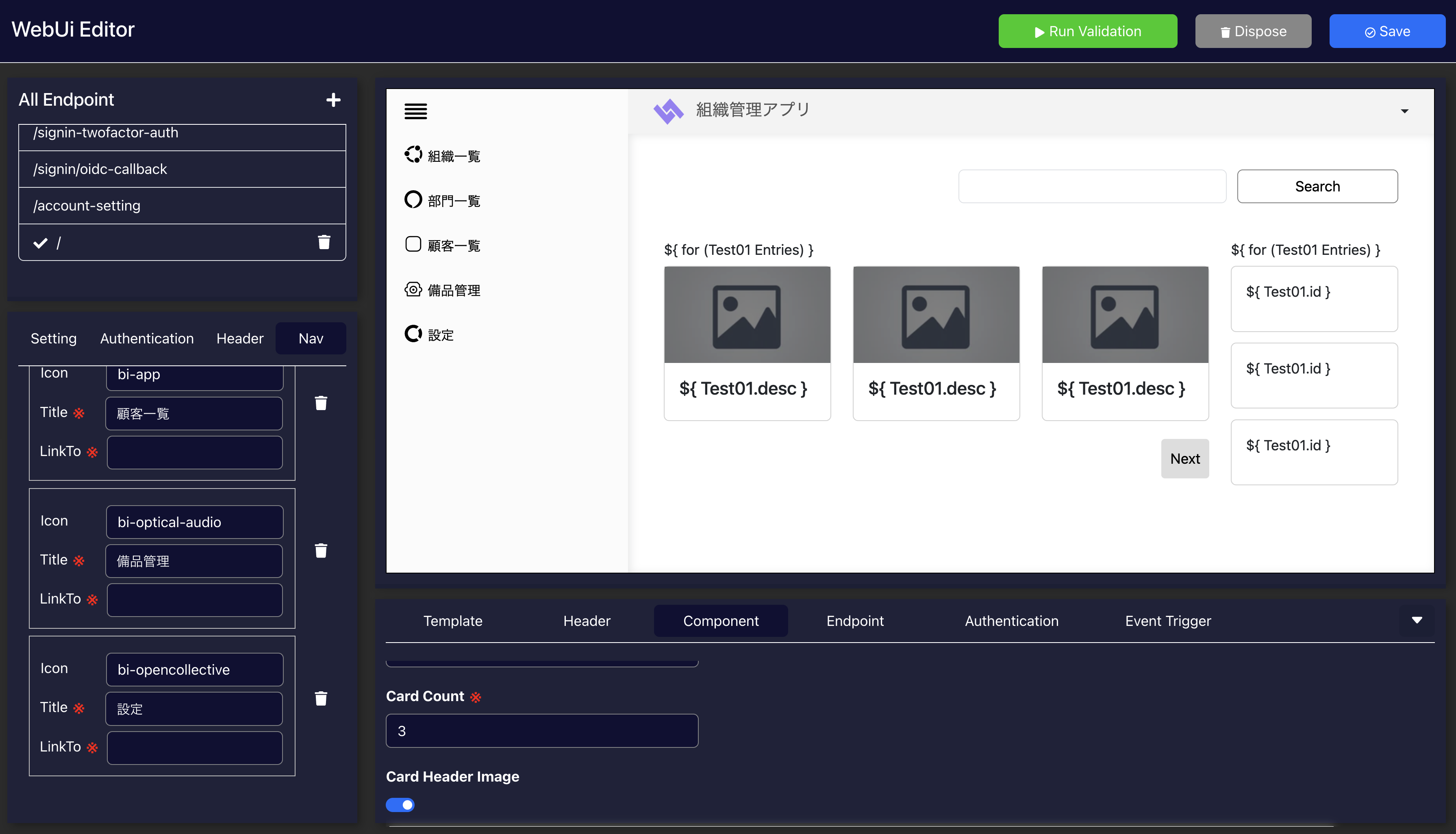
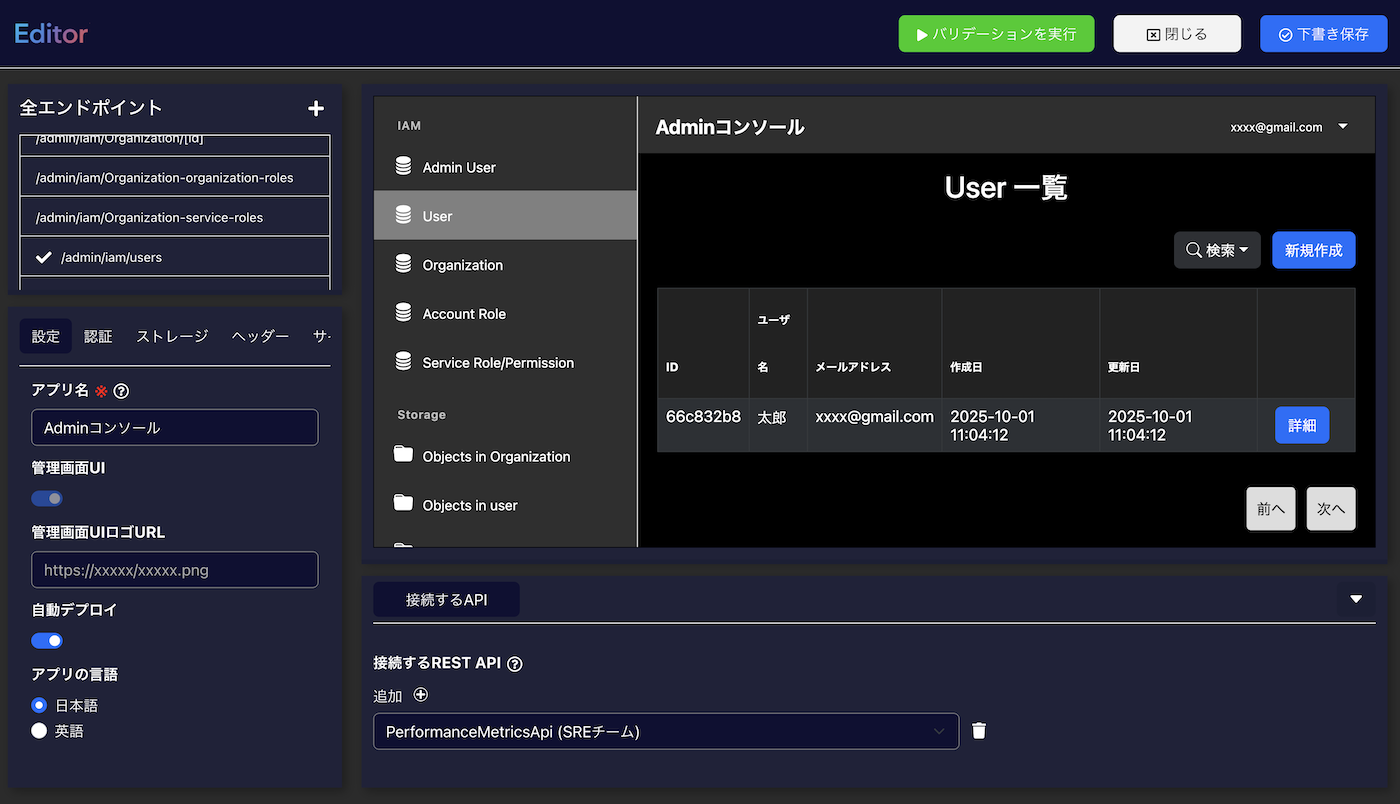
Drag-and-drop screen components, configure the data model, and build forms. Working output appears immediately, so you can review with business users as you go.
Configure data, permissions, and flows
Set up role-based permissions, approval flows, automated notifications, dashboard aggregations, and other operational configuration — all in the editor.
Go live and iterate
Invite users and start operating. Take feedback from the field and further adjust screens and flows — all rollable out same-day via the editor.
No-code Editor
What you can build
Because you assemble screens in the editor, you can build industry-specialized systems that generic SaaS can't handle, as well as business systems with unique workflows.
Common concerns
Common questions from business users
Questions we actually receive from business users considering adoption.
Q.Can the editor really be used by business users?+
Q.How long does it take?+
Q.Can it integrate with existing SaaS and systems?+
Q.Can we add or change things after go-live?+
Q.How much design skill do we need?+
Target customers
Who this is for
Best for companies whose business doesn't fit generic SaaS, but who can't spend the time and cost of full scratch — the middle ground.
Companies wanting to design screens and fields for their business
For companies with industry- or department-specialized work, where generic SaaS is hard to fit or hard to use well in many spots.
Companies without development resources
You can move forward even without an internal IT department, without being able to spend millions on dev vendors, but still wanting a system that fits your business.
Companies where business changes frequently
For companies where business flows and forms are frequently revised, placing orders with dev vendors each time isn't sustainable. The strength of same-day rollout in the editor becomes valuable.
Comparing options
Compare and evaluate 3 options
We compared three approaches to launching a business system across five aspects. Choose what fits your situation.
For companies where business is so unique that ready-made systems can't fit, or wanting to build large-scale unique competitive advantage.
For companies wanting to assemble screens and fields to fit their business, but avoiding development resources.
For companies that can fit their business flow to SaaS patterns, prioritizing speed, cost, and simplicity.
See Catalog same-day build →Download
Download the Specialized System Build materials
We'll send a single document summarizing the editor's features, build examples, estimated pricing, and customization scope.
- Service overview and estimated pricing
- Industry-specific adoption examples and setup images
- FAQ and the deployment flow
* After your request, we'll contact you within 1 business day.